
Bot Engine
Deploy AI-powered bots that scan their assigned asset on a fixed cadence, open trades when conviction is high, and manage them through close.
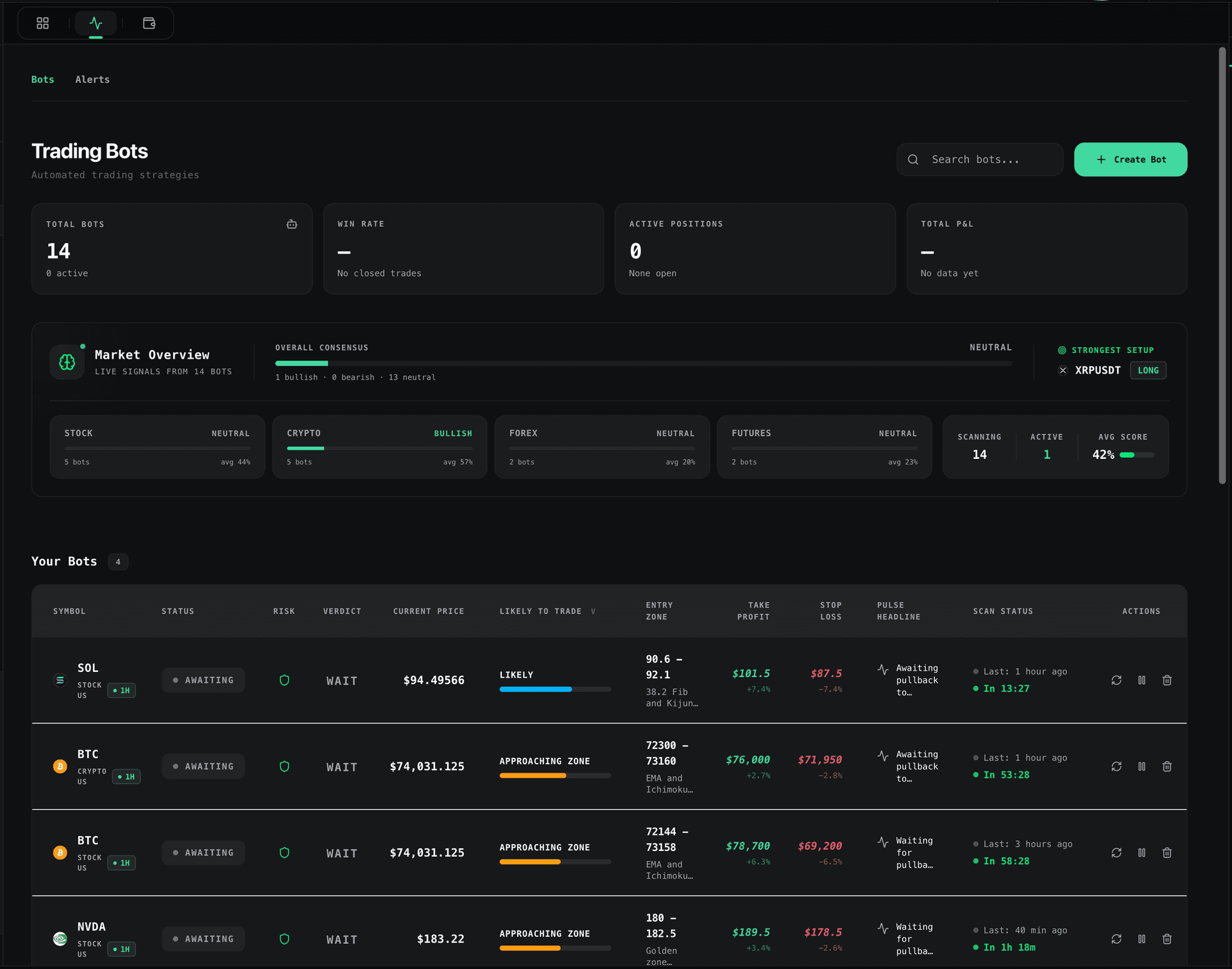
Bot dashboard: monitor every bot, its current state, and active positions
What a TradingWizard Bot Is
A TradingWizard bot is an autonomous agent bound to a single asset and timeframe. It runs inside the platform's bot engine (lib/botEngine.ts), driven by a one-minute cron (/api/cron/process-bots), and delegates every decision to Wiz Fast, or Wiz with web search on Ultimate. Each bot handles its own scanning, trade opening, monitoring, and closing end-to-end.
Lifecycle
Every bot progresses through a strict state machine. Each tick of the cron advances whichever bots are due.
Scanning
State: Scanning. Trigger: scan interval elapsed (defaults to the bot timeframe, 4H). Next: Opening on BUY/SELL at ≥60% confidence, otherwise stays Scanning.
Opening
Trigger: valid verdict + validated SL/TP. The bot calls the active executor to place the trade. Next: Monitoring on fill, or Error on failure. After 5 consecutive open failures the bot auto-pauses.
Monitoring / Open
Trigger: ~5 minute re-check. lib/analyzeOpenTrade.ts may adjust SL/TP or trail the stop. Next: Closing when target is hit or trailing stop triggers.
Closing
Trigger: take-profit, stop-loss, or trailing-stop event. The executor closes the position and PnL is settled. Next: Scanning.
Error
Trigger: executor or data failure. The bot logs the incident and retries on the next cycle. 5 consecutive failures pause the bot until the operator resumes it.
Deploying a Bot
Open the Deploy Bot modal from the Bots tab and walk through the steps below.
Pick an Asset
Use the asset search inside the modal to bind the bot to a single ticker: crypto (BTCUSDT, ETHUSDT), stocks (AAPL, NVDA), or forex (EURUSD, GBPJPY).
Choose an Execution Style
Execution Style shapes how the AI interprets the tape.
AI-Optimized
The model chooses the approach that best fits the current tape.
Momentum
Breakouts and volume expansions on shorter timeframes.
Trend
Established trends with pullback entries.
Position
Longer holds on daily and weekly charts.
Pick a Risk Profile
Risk Profile sets the percentage of your virtual balance allocated per trade.
- Conservative: 2% per trade.
- Moderate: 5% per trade.
- Aggressive: 10% per trade.
Optional Custom Prompt
Add a free-text instruction ("only long breakouts above the prior day high", "avoid trading through FOMC") that the AI honors on every scan.
Optional Global Publish
Toggle Global to publish the bot to the public fleet so other users can discover and follow it. Leave it off to keep the bot private to your account.
Deploy
Hit Deploy. The bot enters the Scanning state and runs on the next cron tick.
How the AI Decides
Scan cadence matches the bot timeframe (default 4H). On each scan, the engine bundles candles, indicators, and the execution-style context and sends them to the model.
- Verdict: BUY, SELL, or WAIT.
- Confidence gate: only BUY/SELL at ≥60% confidence proceeds to the opening state.
- SL/TP validation: stop-loss and take-profit are checked for direction (SL on the protective side, TP on the profit side). If the model crosses them, the verdict is flipped to WAIT.
Monitoring & Exits
Once a trade is open, the bot re-evaluates it every ~5 minutes via lib/analyzeOpenTrade.ts.
- The AI can tighten or widen SL/TP as structure evolves.
- A trailing stop locks in profit once the trade moves in favor.
- Positions close on a target hit or trailing-stop trigger.
- After 5 consecutive failed open attempts, the bot auto-pauses and waits for the operator.
Global vs Private Bots
Global
Published to the public fleet. Other users can see its performance, follow it, and mirror its signals. Enable via the Global toggle in the Deploy Bot modal.
Private
Default. Only visible inside your own terminal. Same engine, same guardrails, just not broadcast to the community.
Following
Follow Any Global Bot
Follow any Global bot and you are told every time it trades: the entry, the stop, the target, the reason, and the result as a percentage. Nothing is opened in your account, so there is no size to set and nothing to fund. How many bots you can follow at once depends on your plan. Unfollow at any time from the bot's page.
Paper vs Live
Bots place trades through a pluggable executor interface.
Paper
Default for all users. Backed by lib/executors/paperExecutor.ts. Trades hit a simulated balance with realistic fills.
Binance
Future executor. Not available yet.
Limits Per Plan
Starter Free
Bot previews only. Signals are blurred and credits are limited. Paper executor.
Pro $39/mo
Limited bot slots. Wiz Fast engine. Paper executor.
Ultimate $99/mo
Unlimited bots. Wiz with web search. Deep research. Follow every Wiz bot.
Next: Risk Management
Position sizing, the kill-switch, and the guardrails that sit between the AI and your balance.
