
Meet Wiz
Wiz is your on-desk trading analyst. It runs on the Wiz engine, reads your active symbol and watchlist as context, and can actually do things in the terminal: deploy a bot, place an alert, or run a full chart analysis.
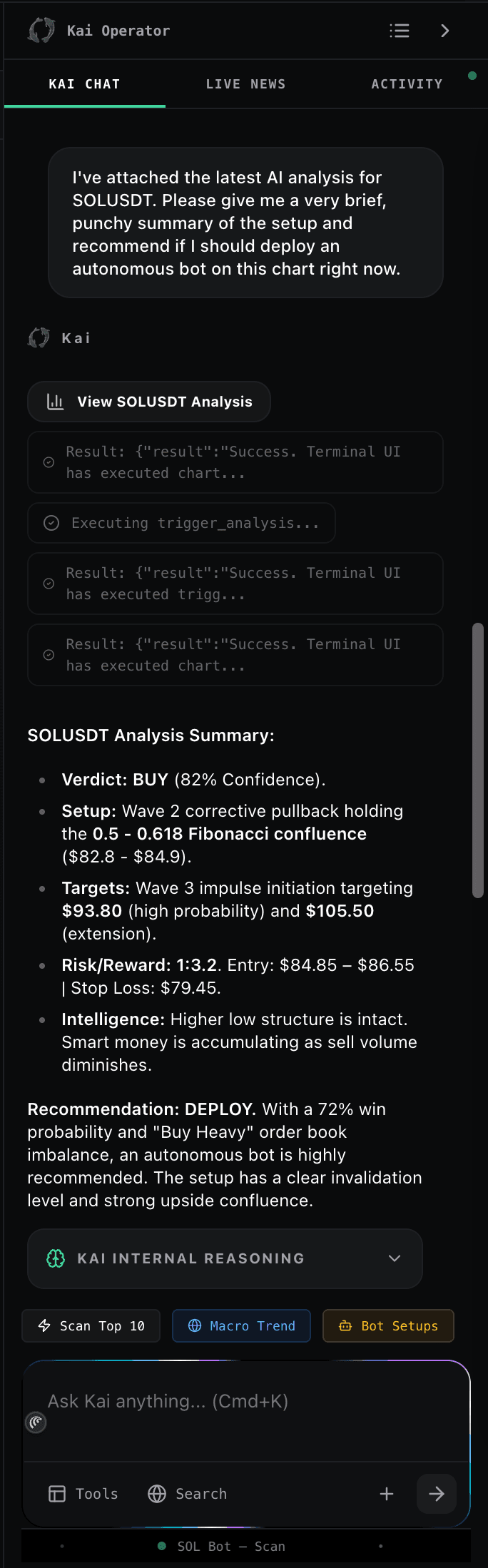
The Wiz Operator Panel, streaming chat with inline Execution Protocol and confirmation cards.
What Wiz can do
Wiz is an agent, not just a chatbot. It answers in plain English, but it can also trigger real actions inside the terminal.
- Analyze a chart: full setup with entry, stop, two targets, confidence, and the indicators behind the call.
- Open a bot: "Deploy a swing bot on SOLUSDT" launches the Deploy Bot flow with fields pre-filled.
- Create alerts: price, RSI, volume-spike, or trend-change alerts with delivery channels.
- Explain patterns: describe candlestick formations, indicator divergences, or order-flow behavior on the current chart.
- Research a ticker: fundamentals, recent news, sector context (Ultimate uses Wiz with web search for deeper results).
- Manage your workspace: add or remove symbols from watchlists, jump the chart to another ticker, or run a screener.
How to use Wiz
Wiz quietly attaches your active symbol, timeframe, and open positions to every message. Load a chart first and Wiz will assume you mean that asset.
Dynamic suggestion chips sit above the input. They change with context, e.g. "Bias for SOLUSDT 4h" while a chart is open, "Summarize today's market" on the overview tab.
Click the paperclip in the input to attach a chart screenshot. Wiz reads the image multimodally and comments on structure, levels, or setup quality.
Example prompts:
- Give me a 4h long setup on SOLUSDT with entry, stop, and two targets.
- Deploy a conservative swing bot on NVDA, 1h timeframe.
- Alert me if BTC breaks $72k on the 15m chart.
Models: Wiz Fast vs Wiz
Wiz is TradingWizard's trading-tuned AI engine. The model badge in the Wiz panel header shows which tier is active, click it to switch where your plan allows.
Fast, low-latency responses. Best for chart questions, quick setups, and day-to-day chat. Streaming usually starts within ~1 second.
Deeper reasoning with web search. Use it for research, fundamental take, or when you want Wiz to argue a thesis end to end. Slower but more thorough.
Wiz Operator actions
When Wiz is about to do something real (open a bot, place an alert, run a full analysis) it inlines a confirmation card in the chat. Nothing executes until you click through. Cards you'll see:
Confirms the symbol and timeframe, then runs POST /api/analyze in the background.
Shows the strategy shape and a Deploy button that launches the Deploy Bot flow pre-filled.
Structured entry / stop / target / confidence block you can act on with one click.
Quick confirmation with direction, size, and risk. Safe default for new users.
Tabular results with per-row actions: load on chart, deploy bot, or set alert.
Daily usage limits
Wiz tracks messages per user per day via User.dailyKaiMessages. The counter resets at UTC midnight.
| Plan | Default model | Daily Wiz messages |
|---|---|---|
| Starter (Free) | Wiz Nano | Daily cap applies |
| Pro ($39/mo) | Wiz Fast | Generous daily allowance |
| Ultimate ($99/mo) | Wiz + web search | Highest allowance, Pro model unlocked |
Exact numeric caps can change. The Wiz panel shows your remaining messages for the day inline in the header.
What Wiz sees (privacy)
To give useful answers, Wiz attaches a small context payload to each request. This is called out here so you know exactly what leaves your workspace:
- Active symbol & timeframe: whatever chart you currently have loaded.
- Your watchlist: ticker symbols only, used to ground references like "my tech list".
- Open trades & bots: a summary of current exposure, so Wiz can reason about risk.
- Your trading profile: level, style, and risk tolerance from onboarding.
Wiz never has access to your password, connected brokerages, or payment methods. All Wiz requests stream through app/api/terminal/kai/route.ts, which is auth-gated.
Next: automate it
Wiz is great for one-off analysis. Bots run the same thinking on a schedule.
